Skip to content

Answer every customer message from one shared inbox.

Customers write to your LINE Official Account, your Facebook Page and your Instagram account. AiRova Chat collects those conversations onto one screen, so your team can reply, assign work to each other and keep the full history of every customer in one place.

Built for shops and support teams in Thailand. Connect your first channel in a few minutes.

The AiRova Chat shared inbox: a conversation list on the left showing chats from LINE, Facebook, Instagram, Shopee and Lazada, the open conversation in the middle, and the customer profile with contact details, spend and recent orders on the right.

Channels you can connect

Nothing changes for your customers. They keep writing to the same accounts they always did.

  • LINE Official Account

    Chats from your LINE OA

  • Facebook Page Messenger

    Messages sent to your Page

  • Instagram Direct

    DMs to your Instagram account

  • Shopee Chat

    Buyer chats and orders

  • Lazada Chat

    Buyer chats and orders

  • Website chat

    A chat widget for your own site

  • WhatsApp Business

    Coming soon

  • TikTok

    Coming soon

What the team actually works in

One inbox the whole team shares

Every channel lands in the same list, newest first, with the channel marked on each conversation. Your team works from one screen instead of switching between phones and browser tabs.

  • Assign a conversation to a teammate so two people do not reply at once
  • Internal notes that only your team can read
  • Tags, saved replies and search across past conversations
  • Customer profile, spend and recent orders beside the chat
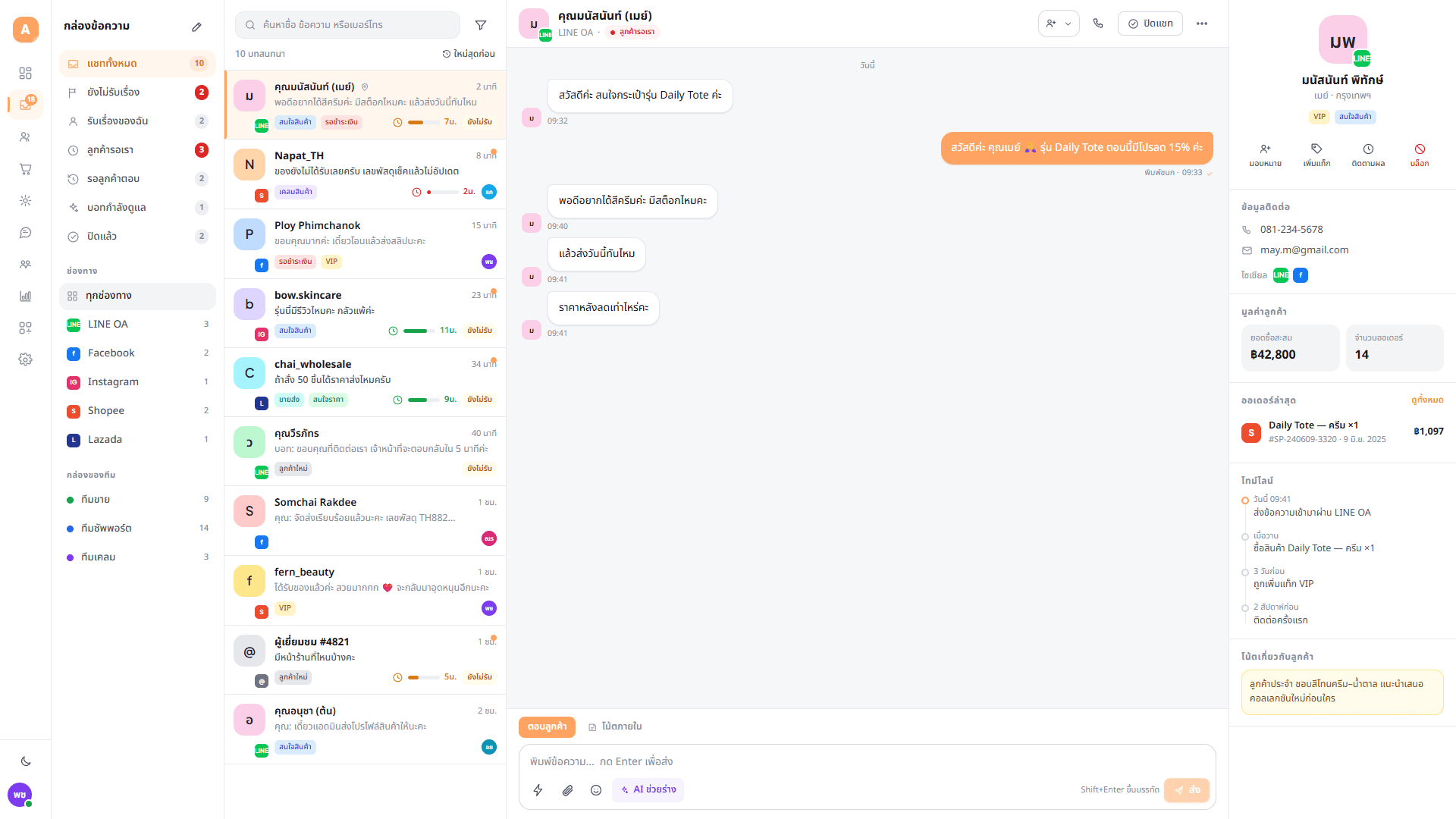
Shared inbox with conversations from LINE, Facebook, Instagram, Shopee and Lazada, an open Thai conversation, and a customer panel showing contact details, total spend and recent orders.

See where the queue stands

How many chats came in today, which channel they came from, how long customers waited for a first reply, and what is still unanswered.

  • Volume by channel and by hour
  • First response time and conversations still waiting
  • Per agent workload and resolution rate
  • Export to CSV for your own reporting
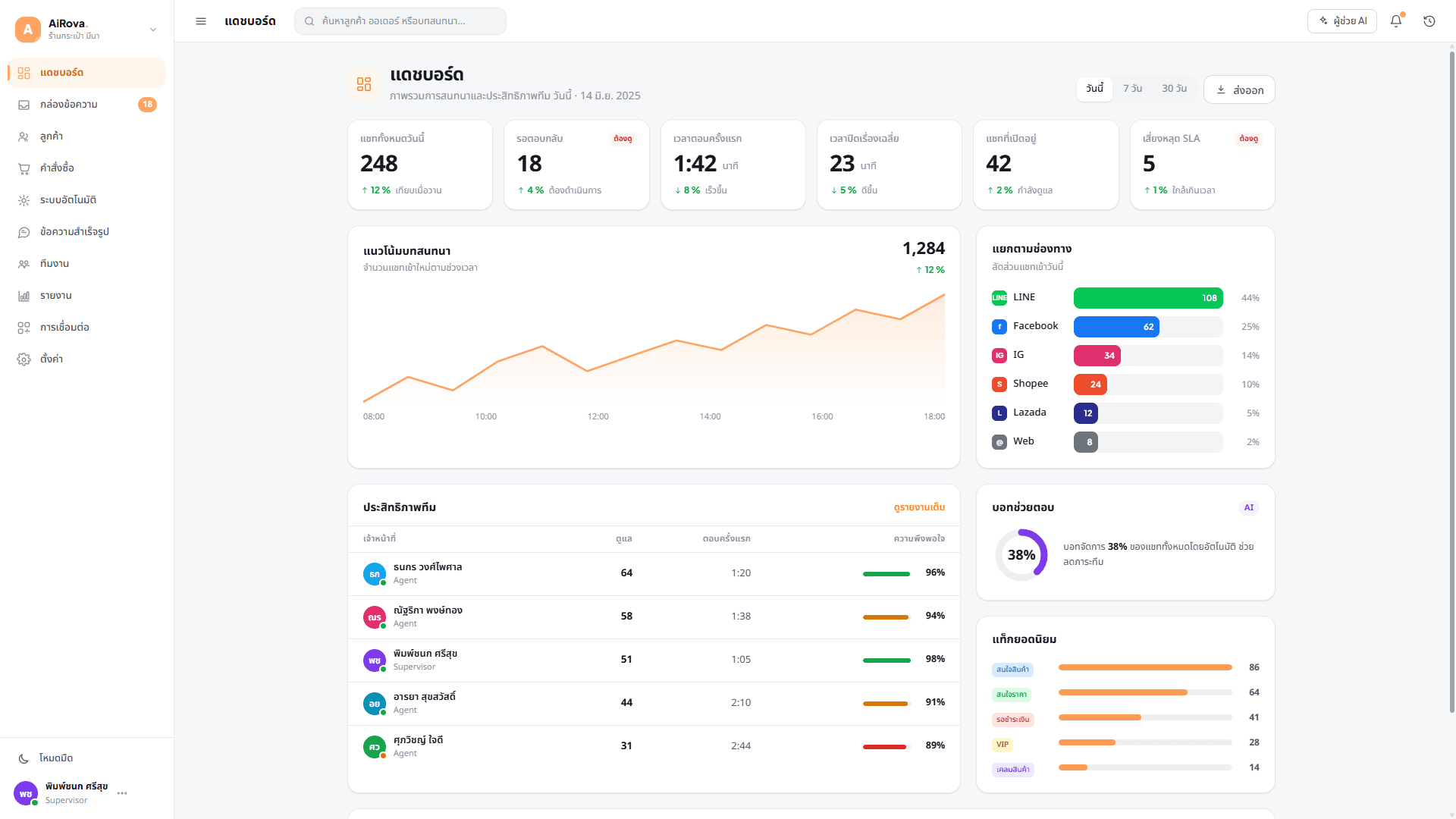
Dashboard showing today's chat volume, first response time, a conversation trend chart, a breakdown by channel, and a table of agent performance.

Connect a channel in a few minutes

Sign in with the account that manages the channel and pick which Page or account to connect. Each connection shows its status, so you can tell straight away when something needs attention.

  • You choose exactly which Pages or accounts the app may access
  • Access tokens are encrypted before they are stored
  • Disconnect any channel at any time, from the same screen
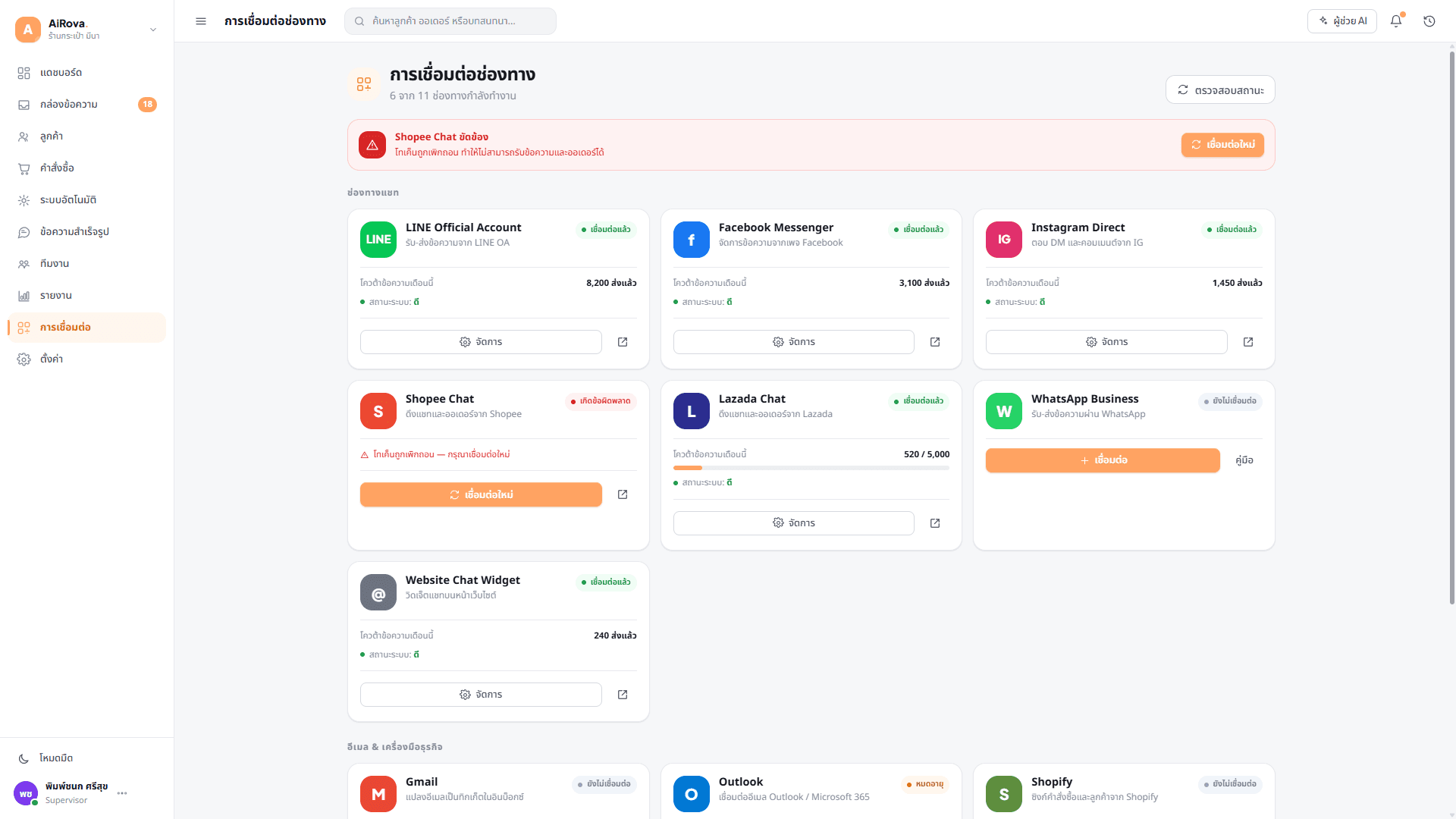
Channel integrations screen listing LINE Official Account, Facebook Messenger, Instagram Direct, Shopee, Lazada, WhatsApp and the website chat widget, each with a connection status.

Connecting a Facebook Page

The same three steps apply to every channel. Facebook is shown here because it is the one people ask about most.

  1. Create your workspace

    Sign up with an email address or a Google account, then invite the people who answer customers. Each person gets their own login and a role that decides what they can do.

  2. Sign in with Facebook and choose the Page

    You are sent to Facebook to sign in. Facebook asks which Pages the app may access, and you tick the ones you want. AiRova Chat receives access only to the Pages you selected, and only to the permissions shown on that screen.

  3. Replies go back on the same channel

    New messages to that Page arrive in the shared inbox within seconds. When your team replies from AiRova Chat, the customer receives it in Messenger, exactly as if you had answered from the Page itself.

What we access, and what we never do with it

AiRova Chat only ever touches the accounts you connect, and only to run the service for you. You can withdraw that access at any time, from inside the app or from your Facebook settings.

What the app receives

  • The name and profile picture of the customer who messaged you
  • The content of the messages in those conversations
  • The name and id of the Page or account you selected
  • Order details, where the channel is a marketplace such as Shopee or Lazada

What we never do

  • Sell your data or your customers' data to anyone
  • Use it for advertising, profiling or audience building
  • Share it with other businesses using AiRova Chat
  • Keep it after you disconnect the channel or close your workspace

Put your first channel in the inbox

Create a workspace, connect a channel and see your real conversations in one place.